Solr-sök med ett mobilvänligt gränssnitt

Började idag på ett utkast för framtida sök till vår Hitta Vård Nu-app. I dagsläget listar den vårdmottagningar i Västra Götalandsregionen, men navigering kan göras via karta. Dock saknas det en sökfunktion.
Så jag slängde in 1,6 miljoner kartpunkter från mapusers.com i Solr och har nu kodat ihop ett snabbt exempel som vår PhoneGap-konsult kan utvärdera.
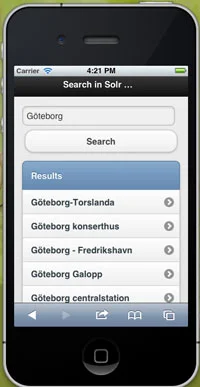
När jag ändå var i farten sminkade jag samma funktion så den kan köras i mobiltelefoner med design från jQuery Mobiles standardtema, se bild till höger.
Exempelkod för sökning i Solr via jQuery och JSONP
<html>
<head>
<title>Search in Solr with jQuery/JSONP/AJAX</title>
<script type="text/javascript" src="https://ajax.googleapis.com/ajax/libs/jquery/1.6.2/jquery.min.js">
</script>
<script type="text/javascript">
function askSolr(query, callback) {
$.ajax({
  'url': 'http://localhost:8983/solr/select',
  'data': {'wt':'json', 'q':query},
  'success': function(data) {
      callback(data);
  },
  'dataType': 'jsonp',
  'jsonp': 'json.wrf'
});
}
   function SolrQuery(query) {
    // removes all previous list items
    $('#hits').empty();
    askSolr(query, function(result) {
  //console.log(result);
  // iterates through the result
  for ( var i = 0; i < result.response.docs.length; i++ ) {
    //console.log(result.response.docs\[i\].name);
    // appends hits to the list
    $("#hits").append("<li><a href=\\"" + result.response.docs\[i\].id + "\\">" + result.response.docs\[i\].name + "</a></li>");
    }
});
};
</script>
</head>
<body>
<h1>Search in Solr with jQuery/JSONP/AJAX</h1>
<input type="text" placeholder="Input your search query" id="q" />
<input type="button" value="Search" onClick="SolrQuery($('#q').val())" />
<h2>Results</h2>
<ol id="hits"></ol>
</body>
</html>
Exempelkod för Solr med jQuery Mobile
<html>
<head>
<meta name="viewport" content="width=device-width, initial-scale=1.0" />
<title>Search in Solr with jQuery Mobile</title>
<script type="text/javascript" src="https://ajax.googleapis.com/ajax/libs/jquery/1.6.2/jquery.min.js">
</script>
<script type="text/javascript" src="http://code.jquery.com/mobile/1.0.1/jquery.mobile-1.0.1.min.js">
</script>
<script type="text/javascript">
function askSolr(query, callback) {
$.ajax({
  'url': 'http://localhost:8983/solr/select',
  'data': {'wt':'json', 'q':query},
  'success': function(data) {
      callback(data);
  },
  'dataType': 'jsonp',
  'jsonp': 'json.wrf'
});
}
    function SolrQuery(query) {
    // removes all previous list items
    //$('#hits').empty();
    $('.hit').remove();

    askSolr(query, function(result) {
  //console.log(result);

  // iterates through the result
  for ( var i = 0; i < result.response.docs.length; i++ ) {
    //console.log(result.response.docs\[i\].name);

    // appends hits to the list
    $("#hits").append("<li class=\\"hit\\"><a href=\\"" + result.response.docs\[i\].id + "\\">" + result.response.docs\[i\].name + "</a></li>");
    }

    $("#hits").listview("refresh");
});
};
</script>
<link href="http://code.jquery.com/mobile/1.0.1/jquery.mobile-1.0.1.min.css" rel="stylesheet" type="text/css" />
</head>
<body>
<div id="header" data-role="header">
<h1>Search in Solr with jQuery Mobile</h1>
</div>
<div id="main" data-role="content">
<input type="text" placeholder="Input your search query" id="q" />
<input type="button" value="Search" onClick="SolrQuery($('#q').val())" />
<ul data-role="listview" data-inset="true" id="hits">
        <li data-role="list-divider"><h2>Results</h2></li>
</ul>
</div>
</body>
</html>